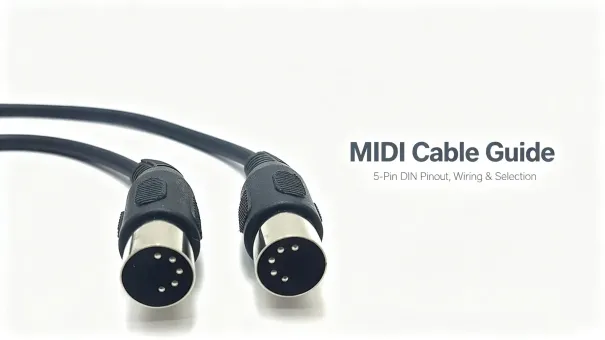
A MIDI cable connects electronic instruments and other MIDI-compatible devices, allowing them to exchange musical performance and control data. Unlike an audio cable, it does not carry sound. Instead, it transmits messages such as note events, velocity, program changes, and timing information between keyboards, synthesizers, drum machines, and other MIDI equipment. The traditional MIDI connection uses 5-pin DIN connectors, making it a familiar interface in hardware music production and live performance.
What Is a MIDI Cable?
A MIDI cable is a shielded serial cable terminated at each end with a 5-pin, 180° DIN connector. It is used to interconnect devices that speak MIDI — short for Musical Instrument Digital Interface — such as synthesizers, keyboards, drum machines, sequencers, hardware effects and audio interfaces.
The job of a MIDI cable is purely digital control. Instead of carrying sound, it carries digital performance and control messages: note events, velocity, program changes, controller movements and timing information. The receiving device interprets these messages and generates or controls the corresponding sound. This is why a cable with no audio signal at all can drive an entire arrangement of hardware instruments.
Only three of the five pins are actually wired. The current-loop design, the 31.25 kbaud rate and the optical isolation at the receiver were all chosen in the 1983 MIDI 1.0 specification to make connections simple, fast and reliable.
A Brief History: Why MIDI Exists
Before MIDI, connecting two synthesizers meant proprietary, manufacturer-specific interfaces or crude control-voltage and gate (CV/gate) wiring. In 1981–1983, the major Japanese and American manufacturers agreed on a single open standard, first published in 1983 as MIDI 1.0, so that any brand's keyboard could control any other brand's synth.
The original specification established a 31.25 kbaud serial interface and opto-isolation at the receiver, creating a common communication method for electronic instruments from different manufacturers while reducing ground-loop problems and unwanted noise between instruments.
The standard proved durable. The 5-pin DIN interface remains widely used with traditional MIDI hardware, while MIDI data also travels over USB and other supported transports, and MIDI 2.0 introduces expanded capabilities beyond the original MIDI 1.0 message system.
Anatomy of the 5-Pin DIN Connector
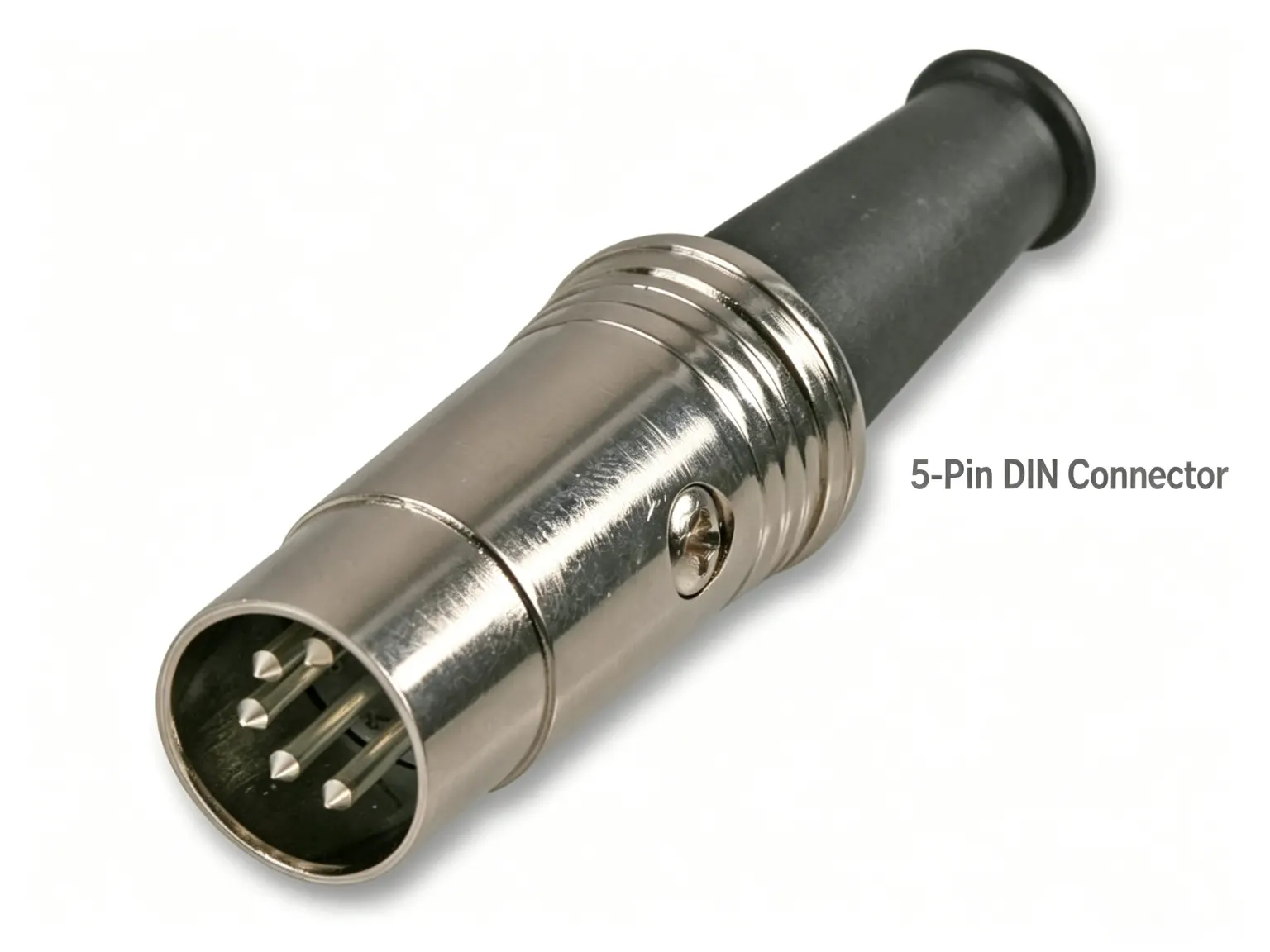
MIDI uses a 5-pin, 180° DIN connector (DIN 41524). On the face of the plug the five contacts form a semicircle, and the plug is keyed with a small guide pin so it can only be inserted one way. Devices mount female panel receptacles labeled MIDI OUT, MIDI IN and MIDI THRU; the cable itself has male 5-pin DIN plugs at both ends and is wired straight through.
Only three pins carry the interface — the remaining two are left unconnected. The five contacts must be identified using the connector manufacturer's pin-numbering diagram; pin positions can appear mirrored when viewed from the mating face rather than the solder or wiring side. Standard MIDI cabling does not require all five conductors to be wired.
|
Pin
|
Function
|
Description
|
|---|---|---|
|
1
|
Not connected
|
Unused in standard MIDI 1.0 wiring.
|
|
2
|
Cable shield
|
Connected to the cable shield; grounding provisions depend on the interface design.
|
|
3
|
Not connected
|
Unused in standard MIDI 1.0 wiring.
|
|
4
|
Signal circuit
|
One side of the MIDI current-loop interface.
|
|
5
|
Signal circuit
|
The other side of the MIDI current-loop interface.
|
How a MIDI Cable Carries Data
MIDI is a serial, asynchronous, unbalanced, unidirectional interface. A byte is framed with one start bit, eight data bits and one stop bit — ten bits total — and transmitted at 31.25 kbaud (±1%). Each byte therefore takes about 320 microseconds, so a single link moves roughly 3,125 bytes per second.
Electrically, MIDI uses a 5 mA current loop rather than a voltage signal; a logic 0 means current is flowing. Because the receiver is optically isolated, the cable can run long distances without dragging ground noise from one instrument into another — a key reason MIDI stays clean over long runs compared with analog sync.
The straight-through wiring means pin 4 at one end talks to pin 4 at the other, and so on. Standard MIDI cables use shielded twisted-pair construction, with the shield connected to Pin 2 at both ends, which rejects interference and hum and keeps long runs (up to about 15 m / 50 ft per the spec) reliable.
MIDI Out, In, and Thru
Every classic MIDI device has one or more of these ports, and a cable connects an output on one machine to an input on another:
-
MIDI OUT — transmits the device's own outgoing data. Connect this to the next device's IN.
-
MIDI IN — receives data from another device. Connect this to the previous device's OUT.
-
MIDI THRU — retransmits the data received at MIDI IN, allowing additional devices to be connected in a chain. Signal timing can be affected by the device's circuitry.
Because a MIDI output is designed to drive a single input, the usual way to reach several instruments is either a chain through THRU ports or a dedicated MIDI thru box / interface.
What MIDI Does Not Do
A MIDI cable cannot replace an audio cable. A keyboard's MIDI OUT connects to a sound source's MIDI IN, but the audio output still needs a separate audio connection unless the device provides its own digital audio transport.
There is also no audio quality to compare: signal fidelity, sample rate and bit depth are irrelevant to a MIDI cable. What matters is that the current-loop data arrives intact and on time.
MIDI Cable vs. USB-MIDI vs. TRS Mini-Jack MIDI
Modern studios add two other ways to move MIDI data. Each suits a different job:
|
Feature
|
5-pin DIN MIDI
|
USB-MIDI
|
TRS mini-jack MIDI
|
|---|---|---|---|
|
Connector
|
5-pin DIN, 180°
|
USB-A / -B / -C
|
3.5 mm TRS
|
|
Standard
|
MIDI 1.0, open spec
|
USB class-compliant MIDI
|
Type A / Type B convention
|
|
Electrical interface
|
5 mA current-loop signaling
|
USB connection; bus power depends on the host and device
|
Electrical signaling and power arrangements depend on device implementation
|
|
Typical installation
|
Between traditional hardware devices; standard run within 15 m
|
Computer, DAW and compatible devices; follows the applicable USB spec
|
Compact devices; confirm the connector type and wiring convention
|
|
Best for
|
Hardware synths, stage racks
|
Computer / DAW / controller
|
Compact and DIY modules
|
Note that MIDI over TRS has two competing wiring conventions (Type A and Type B); devices must share the same type or use an adapter. This is one more reason the classic 5-pin cable remains the safest, most interchangeable choice.
How to Choose a MIDI Cable
Because a MIDI cable carries control data rather than audio, the purchase decision is simpler — but not zero:
-
Shielding — look for a properly shielded, twisted-pair construction to reject hum and interference on longer runs.
-
Connector quality — solidly terminated 5-pin DIN plugs with strain relief last through years of studio plugging and unplugging.
-
Length — keep standard MIDI cable runs within the specified 15 m / 50 ft maximum. For longer distances, evaluate a suitable MIDI extender or another supported transport based on the installation requirements.
-
Straight-through wiring — the cable must pass pins 2, 4 and 5 straight through; avoid adapters or "crossed" wiring for normal use.
-
Purpose — for a controller-to-computer setup, a USB-MIDI cable may be more convenient; for chaining hardware, the DIN cable is the standard.
For engineers and buyers sourcing a cable, use the following checklist when reviewing a supplier or a finished part:
|
Checklist item
|
What to confirm when buying or producing
|
|---|---|
|
Connector
|
5-pin, 180° DIN male plug; confirm the mating interface and housing form factor fit the enclosure and installation space.
|
|
Wiring
|
Correct connection of pins 2, 4 and 5; pins 1 and 3 left unwired per standard MIDI practice.
|
|
Cable construction
|
Shielded twisted-pair construction per the MIDI electrical spec, with the shield connected to Pin 2 at both ends; confirm capacitance, flexibility and mechanical durability for the target length and application.
|
|
Mechanical design
|
Bend radius, pull strength, strain relief and housing retention required by the application.
|
|
Testing
|
Continuity on the specified pins, no unintended connections on unwired pins, and correct shield connection.
|
Frequently Asked Questions
Does a MIDI cable carry audio?
No. It carries digital control data only — notes, velocity, control changes and clock. Audio is produced by the receiving device itself.
How long can a MIDI cable be?
The MIDI spec recommends about 15 meters (50 feet) maximum for a standard run, thanks to its 5 mA current loop and opto-isolation.
Can I use an old DIN cable for MIDI?
Only if it is wired straight through to the correct pins. Many legacy DIN cables are used for audio or other signals, so confirm pin 2 (shield) and pins 4 and 5 (signal circuit) match MIDI.
What is the difference between MIDI IN, OUT and THRU?
OUT transmits your device's data, IN receives data, and THRU retransmits the incoming data so you can chain additional devices.
Is MIDI still used today?
Yes. The 5-pin DIN interface remains widely used with traditional MIDI hardware, and MIDI data also travels over USB and other transports. MIDI 2.0 adds expanded capabilities rather than replacing the classic interface.
Conclusion
The 5-pin DIN MIDI cable remains a practical connection method for traditional MIDI hardware: a single, shielded, straight-through cable that moves control data reliably at 31.25 kbaud, designed to reduce ground-loop interference and free of audio-quality compromises. Understanding its pinout, electrical interface, cable construction and length limits helps engineers and buyers specify compatible cables and verify them before installation.